Flows
A flow is an ETL/ELT process and the main execution object. A flow consists of nodes. The flow type determines which nodes are used and which settings are available to the user.
Flow types:
- Integration flow
- Transformation flow
The table shows the allowed combinations of flows and nodes:
| Flow type | Node | PostgreSQL | ClickHouse | Python |
|---|---|---|---|---|
| Integration flow | Source node | Yes | No | Yes |
| Integration flow | Target node | Yes | Yes | No |
| Transformation flow | Source & Target node | Yes | Yes | No |
If slashes are used in the flow name, the flow will be saved into a folder:
my_flow/flow_1_integration
Integration flow
An integration flow is used to deliver data from one system to another. The main purpose of this flow type is data delivery, not transformation. Transformation can be performed on the source side, but only when necessary. An integration flow consists of two nodes: a source node and a target node. Settings are configured inside the nodes. Source node → Target node.
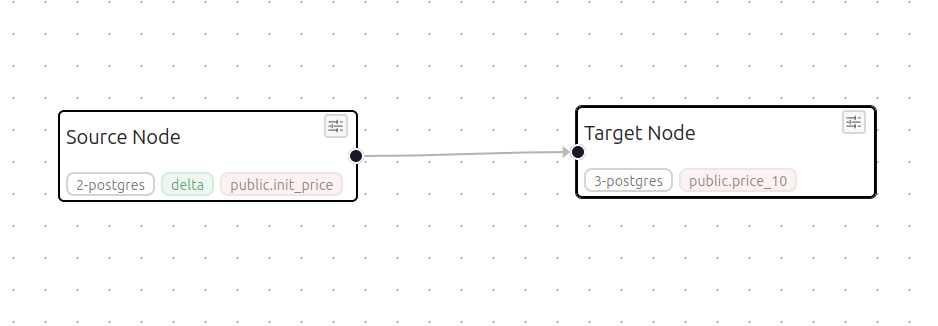
Source Node
Source Node is used to configure source settings. First, select one of the Connections, then the system will generate additional fields.
PostgresSQL
For the PostgreSQL connection type, incremental loading can be configured using the Mode field. Then define the delta column, specify its type, set the date from which the initial load will start, set the batch size in the time dimension, and, if necessary, add a left-side extension for the time interval. We also recommend specifying an interval for merging "tails" into the main packet. This interval is set in the "Tail merge seconds" field.
Field descriptions
| Field | Description |
|---|---|
| Connection | Name of the connection to the source database (for example, pg_Source) |
| Source schema name | Name of the schema in the database where the source table is located |
| Source table name | Name of the source table for data loading |
| Columns | List of columns extracted from the table (can be updated through the interface) |
| Source SQL | If necessary, an SQL transformation is written, which is performed in the source |
| Mode | Data loading mode: full or delta |
| Delta column | Name of the column used to track changes for delta loading |
| Delta column type | Data type of the delta column (for example, date or timestamp) |
| Delta init start | Initial date or value from which the first incremental load will start |
| Batch grain | Granularity of data batching during loading (for example, by days) |
| Tail merge seconds | Time interval in seconds for attaching the packet "tail" to the main packet |
| Safety days | Number of days used to extend the interval to the left in order to overwrite possible late-arriving data |
Python
For the Python connection type, the data source is defined through a user Python script. This option is used when data needs to be received not directly from a database, but through an API, file, external service, or other custom logic. The user selects a Python connection, then selects one of the uploaded files and the function that will be executed first when the flow starts. The function must return data as a regular list or a DataFrame.
Field descriptions
| Field | Description |
|---|---|
| Connection | Python connection through which the script will be executed |
| Python script | Existing Python script selected from the scripts workspace folder |
| Name for new Python script | Name or path for a new script if the user uploads a file |
| Function name | Name of the function inside the Python script that Belt should call |
| Output columns | List of columns returned by the Python function |
| Params JSON | Additional parameters in JSON format that will be passed to the function |
| Mode | Data loading mode: full or delta |
| Delta column | Logical column used to build incremental loading |
| Delta column type | Type of the delta column: for example, date, timestamp, or int |
| Delta init start | Initial value for the first incremental load |
| Batch grain | Size of one data batch, for example day |
| Safety days | Left-side interval extension for re-fetching data and protecting against late-arriving records |
Target Node
Target Node is used to configure target settings. First, select one of the Connections, then the system will generate additional fields.
PostgresSQL
For the PostgreSQL connection type, specify the schema and target table. All other settings are optional.
PostgreSQL
| Field | Required | Description |
|---|---|---|
| Connection | Yes | Name of the connection to the target database (for example, pg_Target) |
| Target schema name | Yes | Name of the schema in the target database where the data will be written |
| Journal table name | Name of the table used for maintaining the load journal or logs (optional) | |
| Target table name | Yes | Name of the target table where the data is stored |
| Truncate table before load | Yes | Flag for fully clearing the target table before each data load starts |
| Additional info(text, json) | Additional information in JSON to be saved in the journal (optional) |
ClickHouse
For the ClickHouse connection type, specify the target table. All other settings are optional.
ClickHouse
| Field | Required | Description |
|---|---|---|
| Connection | Yes | Name of the connection to the target database |
| Target table name | Yes | Name of the target table where the data is stored |
| Truncate table before load | Yes | Flag for fully clearing the target table before each data load starts |
| Additional info(text, json) | Additional information in JSON to be saved in the journal (optional) |
Transformation flow
A transformation flow is used to transform data with SQL in the target system. The main principle of the platform is to preserve freedom for data processing. Therefore, transformations are executed in the target using plain SQL.
A transformation flow consists of three nodes: source, transformation, and target. In a transformation flow, data is loaded in batches. Source node → SQL node → Target node
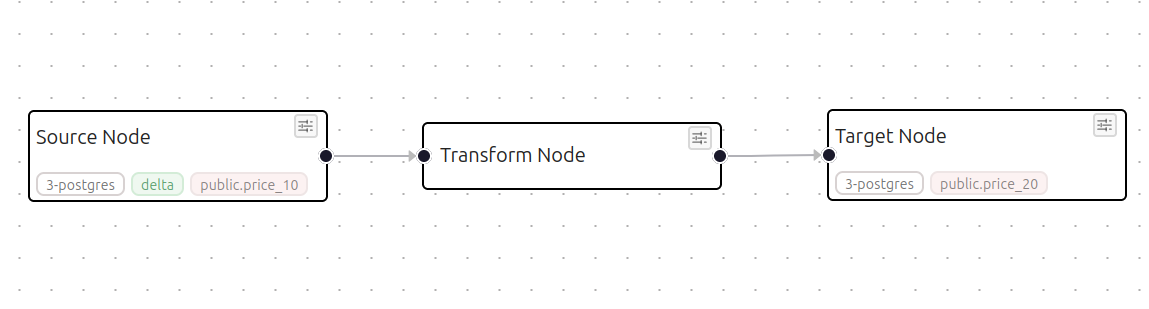
Source Node
Source node is used to configure source settings. There are two modes: delta and full. In delta mode, only new packages that have not yet been loaded are taken. In full mode, all data is taken every time.
PostgresSQL
For a Postgres source, specify the schema, table, and loading mode.
ClickHouse
For a ClickHouse source, specify the table and loading mode.
Transform Node
This node has only one field for SQL code. Full freedom of action. In addition, a system condition {where_cond_source} must be added for the source table. This condition contains the selection condition for a specific data batch. There is also an anchor inside which SQL code is executed before the main transformation SQL is executed. -- @pre_hook_start -- @pre_hook_end
Below is an example implementation of an SCD2 (Slowly Changing Dimension Type 2) transformation model in SQL:
-- @pre_hook_start
-- Close old record versions if the data has changed
UPDATE public.price_20 d
SET valid_to = n."date"::date
FROM (
    SELECT
        code,
        "date",
        value
    FROM public.price_10
    {where_cond_source}
) n
WHERE d.code = n.code
  AND d.valid_to = '9999-12-31'::date
  AND d.value IS DISTINCT FROM n.value::float4
  AND n."date"::date > d.valid_from;
-- @pre_hook_end

-- Select new records for insertion into the target table
SELECT
    code,
    value::float4 AS value,
    "date"::date AS valid_from,
    '9999-12-31'::date AS valid_to
FROM public.price_10
{where_cond_source}
Target Node
Target Node is used to configure target settings. First, select one of the Connections, then the system will generate additional fields.
PostgresSQL
For a PostgreSQL target, configure the action for key-column conflicts: update the record or do nothing. If the delta column changed its name during the transformation, this must be specified in the corresponding field.
PostgresSQL
| Field | Description |
|---|---|
| Connection | Name of the connection to the target database (for example, pg_Target) |
| Target schema name | Name of the schema in the target database where transformation results will be written |
| Journal table name | Name of the table used for maintaining the load journal or logs (optional) |
| Target table name | Name of the result table where the data is stored |
| Columns | List of target table columns (can be updated through the interface) |
| Truncate table before load | Flag for fully clearing the target table before the transformation starts |
| Additional info(text, json) | Additional configuration parameters in free-text format or JSON (optional) |
| Postgres version | Version of the PostgreSQL DBMS used for correct query syntax |
| Target delta column | Column in the target table used to track incremental changes (It must be specified when renaming the delta column during transformation) |
| Recalculate target delta boundaries | This is essential when handling transformation batch boundaries—for example, during aggregation. |
| Key columns | Key columns (business keys) used to determine record uniqueness during updates (optional) |
| On conflict | Conflict resolution strategy when key values match, for example nothing or update (optional) |
ClickHouse
For a ClickHouse target, the settings are simple. As is known, the main processing mechanisms are defined in the ClickHouse engine itself when the table is created. If the delta column changed its name during the transformation, this must be specified in the corresponding field.
ClickHouse
| Field | Description |
|---|---|
| Connection | Name of the connection to the target ClickHouse database (for example, ch_mart) |
| Target table name | Name of the target table in ClickHouse where the data is stored |
| Target delta column | Column in the target table used to track incremental changes if it differs from the source batch column (It must be specified when renaming the delta column during transformation) |
| Columns | List of target table columns (can be updated through the interface) |
| Additional info(text, json) | Additional configuration parameters in free-text format or JSON (optional) |